
R211x-HP Flexfabric 11900 High Availability Configuration Guide

50
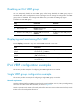
Disabling an IPv6 VRRP group
You can temporarily disable an IPv6 VRRP group. After being disabled, the VRRP group stays in
initialized state, and its configurations remain unchanged. You can change the configuration of a VRRP
group when it is disabled. Your changes take effect when you enable the VRRP group again.
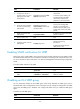
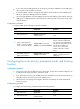
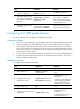
To disable an IPv6 VRRP group:
Ste
p
Command
Remarks
1. Enter system view.
system-view N/A
2. Enter interface view.
interface interface-type
interface-number
N/A
3. Disable an IPv6 VRRP group.
vrrp ipv6 vrid virtual-router-id
shutdown
By default, an IPv6 VRRP group is
enabled.
Displaying and maintaining IPv6 VRRP
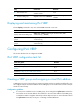
Execute display commands in any view and the reset command in user view.
Task Command
Display the states of IPv6 VRRP
groups.
display vrrp ipv6 [ interface interface-type interface-number [ vrid
virtual-router-id ] ] [ verbose ]
Display statistics for IPv6 VRRP
groups.
display vrrp ipv6 statistics [ interface interface-type interface-number
[ vrid virtual-router-id ] ]
Clear statistics for IPv6 VRRP
groups.
reset vrrp ipv6 statistics [ interface interface-type interface-number [ vrid
virtual-router-id ] ]
IPv4 VRRP configuration examples
This section provides examples of configuring IPv4 VRRP applications on switches.
Single VRRP group configuration example
This section provides an example of configuring a single VRRP group on switches.
Network requirements
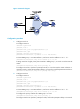
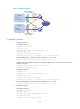
Switch A and Switch B form a VRRP group and use the virtual IP address 10.1.1.111/24 to provide gateway
service for the subnet where Host A resides, as shown in Figure 16.
S
witch A operates as the master to forward packets from Host A to Host B. When Switch A fails, Switch
B takes over to forward packets for Host A.