
R211x-HP Flexfabric 11900 High Availability Configuration Guide

77
• The Positive state of the track entry shows that the object is available, and the apply clause is valid.
• The Negative state of the track entry shows that the object is not available, and the apply clause is
invalid.
• The NotReady state of the track entry shows that the apply clause is valid.
The following objects can be associated with a track entry:
• Outgoing interface.
• Next hop.
• Default outgoing interface.
• Default next hop.
Configuration prerequisites
Before you associate Track with PBR, create a policy or a policy node and configure the match criteria as
well.
Configuration procedure
You can associate a nonexistent track entry with PBR. The association takes effect only after you use the
track command to create the track entry.
To associate Track with IPv4 PBR:
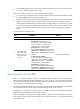
Step Command Remarks
1. Enter system view.
system-view N/A
2. Create a policy or policy
node and enter PBR policy
node view.
policy-based-route policy-name [ deny |
permit ] node node-number
N/A
3. Define a match criterion.
if-match acl { acl-number | name acl-name }
By default, no packets
are filtered.
4. Associate Track with PBR.
apply next-hop [ vpn-instance
vpn-instance-name | inbound-vpn ]
{ ip-address [ direct ] [ track
track-entry-number ] }&<1-n>
N/A
To associate Track with IPv6 PBR:
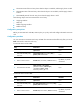
Step Command Remarks
1. Enter system view.
system-view N/A
2. Create a policy or policy
node and enter PBR policy
node view.
ipv6 policy-based-route policy-name [ deny |
permit ] node node-number
N/A
3. Define a match criterion.
if-match acl { acl6-number | name acl6-name }
By default, no packets
are filtered.