
R211x-HP Flexfabric 11900 IP Multicast Configuration Guide
102
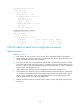
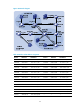
the SPT path (Switch A and Switch D) have generated an (S, G) entry, but Switch E, which is not on the
SPT path, does not have multicast routing entries. You can use the display pim routing-table command to
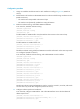
display the PIM routing table information on each switch. For example:
# Display PIM routing table information on Switch A.
[SwitchA] display pim routing-table
Total 0 (*, G) entry; 1 (S, G) entry
(10.110.5.100, 232.1.1.1)
Protocol: pim-ssm, Flag:
UpTime: 00:13:25
Upstream interface: Vlan-interface101
Upstream neighbor: 192.168.1.2
RPF prime neighbor: 192.168.1.2
Downstream interface(s) information:
Total number of downstreams: 1
1: Vlan-interface100
Protocol: igmp, UpTime: 00:13:25, Expires: 00:03:25
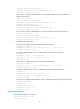
# Display PIM routing table information on Switch D.
[SwitchD] display pim routing-table
Total 0 (*, G) entry; 1 (S, G) entry
(10.110.5.100, 232.1.1.1)
Protocol: pim-ssm, Flag: LOC
UpTime: 00:12:05
Upstream interface: Vlan-interface300
Upstream neighbor: NULL
RPF prime neighbor: NULL
Downstream interface(s) information:
Total number of downstreams: 1
1: Vlan-interface105
Protocol: pim-ssm, UpTime: 00:12:05, Expires: 00:03:25
Troubleshooting PIM
A multicast distribution tree cannot be correctly built
Symptom
A multicast distribution tree cannot be correctly built because no multicast forwarding entries are
established on the routers (including routers directly connected with multicast sources or receivers) in a
PIM network.
Analysis
• On a PIM-DM enabled network, multicast data is flooded from the router that directly connects to
the multicast source to the routers that directly connects to the receivers. When the multicast data is
flooded to a router, the router creates an (S, G) entry only if it has a route to the multicast source. If
the router does not have a route to the multicast source, or if PIM-DM is not enabled on the RPF
interface toward the multicast source, the router cannot create an (S, G) entry.