
R211x-HP Flexfabric 11900 IP Multicast Configuration Guide

119
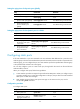
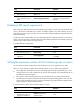
Ste
p
Command
Remarks
3. Set the maximum number of
IPv6 multicast groups on a
port.
mld-snooping group-limit limit
[ vlan vlan-list ]
The default setting is
4294967295.
Enabling the IPv6 multicast group replacement function
When the number of IPv6 multicast groups on a switch or a port exceeds the limit:
• If the IPv6 multicast group replacement is enabled, the switch or the port replaces an existing IPv6
multicast group with a newly joined IPv6 multicast group.
• If the IPv6 multicast group replacement is disabled, the switch or the port discards MLD reports for
joining a new IPv6 multicast group.
In some specific applications, such as channel switching, a newly joined IPv6 multicast group must
automatically replace an existing IPv6 multicast group. In this case, the function of IPv6 multicast group
replacement must also be enabled so a user can switch from the current IPv6 multicast group to a new
one.
When you enable the IPv6 multicast group replacement function, follow these guidelines:
• This configuration takes effect for the multicast groups that the port dynamically joins. If you
configure the port as a static member port for a multicast group, this configuration does not take
effect for the multicast group.
• You can enable the multicast group replacement function either for the current port in proper
interface view or globally for all ports in MLD-snooping view. If the configurations are made in both
interface view and MLD-snooping view, the configuration made in interface view takes priority.
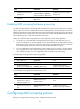
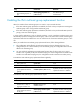
To enable the IPv6 multicast group replacement function globally:
Ste
p
Command
Remarks
1. Enter system view.
system-view N/A
2. Enter MLD-snooping view.
mld-snooping N/A
3. Enable the IPv6 multicast
group replacement function
globally.
overflow-replace [ vlan vlan-list ]
By default, the IPv6 multicast group
replacement function is disabled.
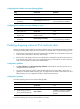
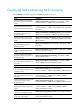
To enable the IPv6 multicast group replacement on a port:
Ste
p
Command
Remarks
1. Enter system view.
system-view N/A
2. Enter Layer 2 Ethernet
interface view or Layer 2
aggregate interface view.
interface interface-type
interface-number
N/A
3. Enable the IPv6 multicast
group replacement function
on the port.
mld-snooping overflow-replace
[ vlan vlan-list ]
By default, the IPv6 multicast group
replacement function is disabled.