
R211x-HP Flexfabric 11900 IP Multicast Configuration Guide


159
Ste
p
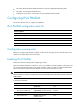
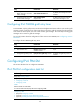
Command Remarks
4. Configure the time to wait
before receiving a new state
refresh message.
state-refresh-rate-limit time
By default, the waiting time is 30
seconds.
5. Configure the hop limit value
of state refresh messages.
state-refresh-hoplimit
hoplimit-value
By default, the hop limit value of
state refresh messages is 255.
Configuring IPv6 PIM-DM graft retry timer
In IPv6 PIM-DM, only the graft process uses the acknowledgment mechanism. After a router sends a graft
message, it starts a graft retry timer. If the router does not receive a graft-ack message from the upstream
router when the timer expires, the router sends another graft message. The router keeps sending graft
messages until it receives a graft-ack message.
For more information about the configuration of other timers in IPv6 PIM-DM, see "Configuring common
PI
M timers."
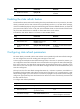
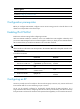
To configure the IPv6 PIM-DM graft retry timer:
Ste
p
Command Remarks
1. Enter system view.
system-view
N/A
2. Enter interface view.
interface interface-type
interface-number
N/A
3. Configure the graft retry timer.
ipv6 pim timer graft-retry interval
By default, the graft retry timer is 3
seconds.
Configuring IPv6 PIM-SM
This section describes how to configure IPv6 PIM-SM.
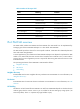
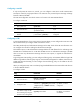
IPv6 PIM-SM configuration task list
Task at a
g
lance
(Required.) Enabling PIM-SM
(Required.) Configuring an RP
• Configuring a static RP
• Configuring a C-RP
NOTE:
Perform at least one of the tasks.
In a network with a static RP, skip the task of configuring a BSR.
Configuring a BSR
• (Required.) Configuring a C-BSR
• (Optional.) Configuring an IPv6 PIM domain border
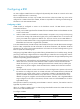
• (Optional.) Disabling the BSM semantic fragmentation function