
R211x-HP Flexfabric 11900 IP Multicast Configuration Guide


165
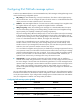
Ste
p
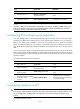
Command Remarks
1. Enter system view.
system-view
N/A
2. Enter IPv6 PIM view.
ipv6 pim [ vpn-instance
vpn-instance-name ]
N/A
3. Configure the criteria for
triggering a switchover to SPT.
spt-switch-threshold { immediacy |
infinity } [ group-policy
acl6-number ]
By default, the device immediately
triggers a switchover to SPT after
receiving the first multicast packet.
Configuring IPv6 PIM-SSM
IPv6 PIM-SSM requires MLDv2 support. Enable MLDv2 on IPv6 PIM routers that connect to multicast
receivers.
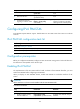
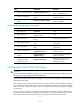
IPv6 PIM-SSM configuration task list
Task at a
g
lance
(Required.) Enabling IPv6 PIM-SM
(Optional.) Configuring the SSM group range
(Optional.) Configuring common IPv6 PIM features
Configuration prerequisites
Before you configure IPv6 PIM-SSM, configure an IPv6 unicast IPv6 routing protocol so that all devices in
the domain are interoperable at the network layer.
Enabling IPv6 PIM-SM
The implementation of the IPv6 SSM model is based on subsets of IPv6 PIM-SM. Therefore, you must
enable IPv6 PIM-SM before configuring IPv6 PIM-SSM.
When you deploy an IPv6 PIM-SSM domain, enable IPv6 PIM-SM on non-border interfaces of the
routers.
IMPORTANT:
A
ll the interfaces on a device must be enabled with the same IPv6 PIM mode.
To enable IPv6 PIM-SM:
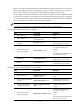
Ste
p
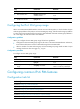
Command Remarks
1. Enter system view.
system-view N/A
2. Enable IP multicast routing,
and enter MRIB view.
ipv6 multicast routing
[ vpn-instance vpn-instance-name ]
By default, IPv6 multicast routing is
disabled.