
R211x-HP Flexfabric 11900 IP Multicast Configuration Guide


168
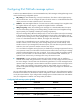
Configuring IPv6 PIM hello message options
In either an IPv6 PIM-DM domain or an IPv6 PIM-SM domain, hello messages exchanged among routers
contain the following configurable options:
• DR_Priority (for IPv6 PIM-SM only)—Priority for DR election. The device with the highest priority
wins the DR election. You can configure this option for all the routers in a shared-media LAN that
directly connects to the IPv6 multicast source or the receivers.
• Holdtime—IPv6 PIM neighbor lifetime. If a router receives no hello message from a neighbor when
the neighbor lifetime timer expires, it regards the neighbor failed or unreachable.
• LAN_Prune_Delay—Delay of forwarding prune messages on a shared-media LAN. This option
consists of LAN delay (namely, prune message delay), override interval, and neighbor tracking
support (namely, the capability to disable join message suppression).
The prune message delay defines the delay time for a router to forward a received prune message
to the upstream routers. The override interval defines a time period for a downstream router to
override a prune message. If the prune message delay or override interval on different IPv6 PIM
routers on a shared-media LAN are different, the largest value takes effect.
A router does not immediately prune an interface after it receives a prune message from the
interface. Instead, it starts a timer (the prune message delay plus the override interval). If the
interface receives a join message before the timer expires, the router does not prune the interface.
Otherwise, the router prunes the interface when the timer expires.
You can enable the neighbor tracking function (or disable the join message suppression function)
on an upstream router to track the states of the downstream nodes that have sent the join message
and the joined state holdtime timer has not expired. If you want to enable the neighbor tracking
function, you must enable it on all IPv6 PIM routers on a shared-media LAN. Otherwise, the
upstream router cannot track join messages from every downstream routers.
• Generation ID—A router generates a generation ID for hello messages when an interface is
enabled with IPv6 PIM. The generation ID is a random value, but only changes when the status of
the router changes. If an IPv6 PIM router finds that the generation ID in a hello message from the
upstream router has changed, it assumes that the status of the upstream router has changed. In this
case, it sends a join message to the upstream router for status update. You can configure an
interface to drop hello messages without the generation ID options to promptly know the status of an
upstream router.
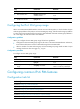
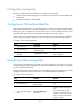
You can configure hello message options in IPv6 PIM view or interface view. The configurations made in
IPv6 PIM view are effective on all interfaces and the configurations made in interface view are effective
on only the current interface. If you configure hello message options in both IPv6 PIM view and interface
view, the configuration in interface view always takes precedence.
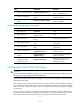
Configuring hello message options globally
Ste
p
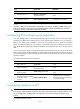
Command Remarks
1. Enter system view.
system-view
N/A
2. Enter IPv6 PIM view.
ipv6 pim [ vpn-instance
vpn-instance-name ]
N/A
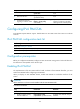
3. Set the DR priority.
hello-option dr-priority priority By default, the DR priority is 1.
4. Set the neighbor lifetime.
hello-option holdtime time
By default, the neighbor lifetime is
105 seconds.