
R211x-HP Flexfabric 11900 IP Multicast Configuration Guide


171
Ste
p
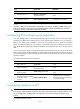
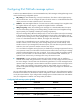
Command Remarks
6. Set the joined/pruned state
holdtime timer.
ipv6 pim holdtime join-prune time
By default, the joined/pruned state
holdtime timer is 210 seconds.
Setting the maximum size of each join or prune message
The loss of an oversized join or prune message might result in loss of massive information. You can set a
small value for the size of each join or prune message to reduce the impact.
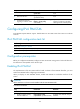
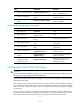
To set the maximum size of each join or prune message:
Ste
p
Command Remarks
1. Enter system view.
system-view
N/A
2. Enter IPv6 PIM view.
ipv6 pim [ vpn-instance
vpn-instance-name ]
N/A
3. Set the maximum size of each
join or prune message.
jp-pkt-size size
By default, the maximum size of a
join or prune message is 8100
bytes.
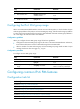
Enabling BFD for IPv6 PIM
IPv6 PIM uses hello messages to elect a DR for a shared-media network. The elected DR is the only
multicast forwarder on the shared-media network.
If the DR fails, a new DR election process will start after the DR is aged out. However, it might take a long
period of time before other routers detect the link failures and trigger a new DR election. To start a new
DR election process immediately after the original DR fails, you can enable BFD for IPv6 PIM on a
shared-media network to detect failures of the links among IPv6 PIM neighbors.
You must enable BFD for IPv6 PIM on all IPv6 PIM-capable routers on a shared-media network, so that the
IPv6 PIM neighbors can fast detect DR failures and start a new DR election process. For more information
about BFD, see High Availability Configuration Guide.
Before you configure this feature on an interface, be sure to enable IPv6 PIM-DM or IPv6 PIM-SM on the
interface.
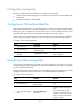
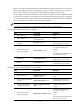
To enable BFD for IPv6 PIM:
Ste
p
Command
Remarks
1. Enter system view.
system-view
N/A
2. Enter interface view.
interface interface-type interface-number N/A
3. Enable BFD for IPv6
PIM.
ipv6 pim bfd enable
By default, BFD is disabled for
IPv6 PIM.
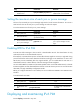
Displaying and maintaining IPv6 PIM
Execute display commands in any view.