
R211x-HP Flexfabric 11900 IP Multicast Configuration Guide


18
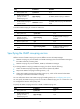
IGMP snooping configuration task list
Task at a
g
lance
Configuring basic IGMP snooping functions
• (Required.) Enabling IGMP snooping
• (Optional.) Specifying the IGMP snooping version
• (Optional.) Setting the maximum number of IGMP snooping forwarding entries
• (Optional.) Configuring parameters for IGMP queries and responses
Configuring IGMP snooping port functions
• (Optional.) Setting aging timers for dynamic ports
• (Optional.) Configuring static ports
• (Optional.) Enabling IGMP snooping fast-leave processing
Configuring IGMP snooping policies
• (Optional.) Configuring a multicast group filter
• (Optional.) Configuring multicast source port filtering
• (Optional.) Enabling dropping unknown multicast data
• (Optional.) Enabling IGMP report suppression
• (Optional.) Setting the maximum number of multicast groups on a port
• (Optional.) Enabling the multicast group replacement function
For IGMP snooping, the configurations made on a Layer 2 aggregate interface do not interfere with the
configurations on its member ports, and they do not take part in aggregation calculations. The
configuration made on a member port of the aggregate group takes effect after the port leaves the
aggregate group.
Configuring basic IGMP snooping functions
Before you configure basic IGMP snooping functions, complete the following tasks:
• Configure the corresponding VLANs.
• Determine the IGMP snooping version.
• Determine the IGMP last-member query interval.
• Determine the maximum response delay for IGMP general queries.
Enabling IGMP snooping
When you enable IGMP snooping, follow these guidelines:
• You must enable IGMP snooping globally before you enable it for a VLAN.
• IGMP snooping for a VLAN works only on the member ports in that VLAN.
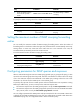
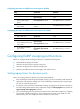
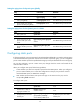
You can enable IGMP snooping for a VLAN in IGMP-snooping view or in VLAN view. The two
configurations have the same priority level.
To enable IGMP snooping for a VLAN in IGMP-snooping view: