
R211x-HP Flexfabric 11900 IP Multicast Configuration Guide

24
• Determine the maximum number of multicast groups that a port can join.
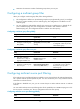
Configuring a multicast group filter
When you configure a multicast group filter, follow these guidelines:
• This configuration is effective on the multicast groups that a port dynamically joins. If you configure
the port as a static member port for a multicast group, this configuration is not effective on the
multicast group.
• You can configure a multicast filter either for the current port in interface view or globally for all
ports in IGMP-snooping view. If the configurations are made in both interface view and
IGMP-snooping view, the configuration made in interface view takes priority.
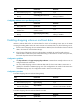
Configuring a multicast group filter globally
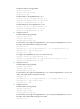
Ste
p
Command
Remarks
1. Enter system view.
system-view N/A
2. Enter IGMP-snooping view.
igmp-snooping N/A
3. Configure a multicast group
filter globally.
group-policy acl-number [ vlan
vlan-list ]
By default, no multicast group filter
is configured. A host can join any
valid multicast group.
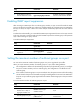
Configuring a multicast group filter on a port
Ste
p
Command
Remarks
1. Enter system view.
system-view N/A
2. Enter Layer 2 Ethernet
interface view or Layer 2
aggregate interface view.
interface interface-type
interface-number
N/A
3. Configure a multicast group
filter on a port.
igmp-snooping group-policy
acl-number [ vlan vlan-list ]
By default, no multicast group filter
is configured on a port. Hosts on
this port can join any valid
multicast group.
Configuring multicast source port filtering
If the multicast source port filtering feature is enabled on a port, the port blocks all multicast data packets,
but it permits multicast protocol packets to pass. You can connect the port to only multicast receivers
rather than to multicast sources.
If this feature is disabled on a port, you can connect the port to either multicast sources or multicast
receivers.
You can enable multicast source port filtering either for the specified ports in IGMP-snooping view or for
the current port in interface view. The two configurations have the same priority.
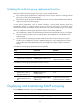
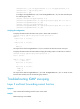
Configuring multicast source port filtering globally
Step Command Remarks
1. Enter system view.
system-view
N/A