
R211x-HP Flexfabric 11900 IP Multicast Configuration Guide

38
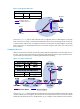
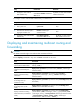
Figure 16 Changing an RPF route
As shown in Figure 16, when no static multicast route is configured, Switch C's RPF neighbor on the path
back to the source is Switch A, and the multicast data from the source travels through Switch A to Switch
C. When a static multicast route is configured on Switch C with Switch B as its RPF neighbor on the path
back to the source, the multicast data from the source travels along the path: Switch A to Switch B and
then to Switch C.
Creating an RPF route
When a unicast route is blocked, multicast forwarding might be stopped due to lack of an RPF route. In
this case, you can create an RPF route by configuring a static multicast route for a given multicast source,
so that a multicast routing entry is created to guide multicast forwarding.
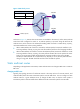
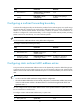
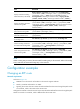
Figure 17 Creating an RPF route
As shown in Figure 17, the RIP domain and the OSPF domain are unicast isolated from each other. When
no static multicast route is configured, the receiver hosts in the OSPF domain cannot receive the multicast
packets from the multicast source in the RIP domain. If you configure a static multicast route on Switch C
Receiver
Switch A
Switch B
Switch C
Vlan-int20
Vlan-int10
1.1.1.1/24
Multicast packets
Source
192.168.0.1/24
Receiver
Vlan-int10
1.1.1.2/24
Multicast static route
Source/Mask
Multicast Routing Table Static on Switch C
192.168.0.0/24
Interface
Vlan-int10
RPF neighbor/Mask
1.1.1.1/24