
R211x-HP Flexfabric 11900 IP Multicast Configuration Guide

39
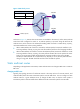
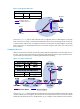
and Switch D, specifying Switch B as the RPF neighbor of Switch C and Switch C as the RPF neighbor of
Switch D, the receiver hosts can receive the multicast data from the multicast source.
NOTE:
A
static multicast route is effective only on the multicast router on which it is configured, and will not be
advertised throughout the network or redistributed to other routers.
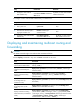
Configuration task list
Tasks at a
g
lance
(Required.) Enabling IP multicast routing
(Optional.) Configuring multicast routing and forwarding:
• (Optional.) Configuring static multicast routes
• (Optional.) Configuring the RPF route selection rule
• (Optional.) Configuring multicast load splitting
• (Optional.) Configuring a multicast forwarding boundary
• (Optional.) Configuring static multicast MAC address entries
NOTE:
The device can route and forward multicast data only through the primary IP addresses of interfaces,
rather than their secondary addresses or unnumbered IP addresses. For more information about primar
y
and secondary IP addresses, and IP unnumbered, see
Layer 3—IP Services Configuration Guide
.
Enabling IP multicast routing
Enable IP multicast routing before you configure any Layer 3 multicast functionality on the public network
or VPN instance.
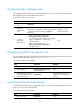
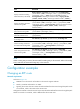
To enable IP multicast routing:
Step Command Remarks
1. Enter system view.
system-view
N/A
2. Enable IP multicast routing
and enter MRIB view.
multicast routing [ vpn-instance
vpn-instance-name ]
By default, IP multicast routing is
disabled.
Configuring multicast routing and forwarding
Before you configure multicast routing and forwarding, complete the following tasks:
• Configure a unicast routing protocol so that all devices in the domain are interoperable at the
network layer.
• Enable PIM-DM or PIM-SM.