
R211x-HP Flexfabric 11900 IP Multicast Configuration Guide

40
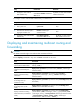
Configuring static multicast routes
By configuring a static multicast route for a given multicast source, you can specify an RPF interface or an
RPF neighbor for the multicast traffic from that source.
To configure a static multicast route:
Step Command Remarks
1. Enter system
view.
system-view
N/A
2. Configure a
static multicast
route.
ip rpf-route-static [ vpn-instance vpn-instance-name ]
source-address { mask-length | mask } { rpf-nbr-address
| interface-type interface-number } [ preference
preference ]
By default, no static
multicast route exists.
3. (Optional.)
Delete static
multicast routes.
• Delete a specific static multicast route:
undo ip rpf-route-static [ vpn-instance
vpn-instance-name ] source-address { mask-length |
mask } { rpf-nbr-address | interface-type
interface-number }
• Delete all static multicast routes:
delete ip rpf-route-static [ vpn-instance
vpn-instance-name ]
N/A
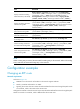
Configuring the RPF route selection rule
You can configure the router to select the RPF route based on the longest prefix match principle. For more
information about RPF route selection, see "RPF check process."
T
o configure a multicast routing policy:
Step Command Remarks
1. Enter system view.
system-view
N/A
2. Enter MRIB view.
multicast routing [ vpn-instance
vpn-instance-name ]
N/A
3. Configure the device to select
the RPF route based on the
longest prefix match.
longest-match
By default, the route with the
highest priority is selected as the
RPF route.
Configuring multicast load splitting
To optimize the traffic delivery for multiple data flows, you can configure load splitting on a per-source
basis or on a per-source-and-group basis.
To configure multicast load splitting:
Step Command Remarks
1. Enter system view.
system-view
N/A