
R211x-HP Flexfabric 11900 IP Multicast Configuration Guide

43
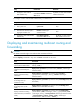
Task Command
Display multicast forwarding
table information (in IRF mode).
display multicast [ vpn-instance vpn-instance-name ] forwarding-table
[ source-address [ mask { mask-length | mask } ] | group-address [ mask
{ mask-length | mask } ] | chassis chassis-number slot slot-number |
incoming-interface interface-type interface-number | outgoing-interface
{ exclude | include | match } interface-type interface-number | statistics ] *
Display information about the
multicast routing table.
display multicast [ vpn-instance vpn-instance-name ] routing-table
[ source-address [ mask { mask-length | mask } ] | group-address [ mask
{ mask-length | mask } ] | incoming-interface interface-type interface-number
| outgoing-interface { exclude | include | match } interface-type
interface-number ] *
Display information about the
static multicast routing table.
display multicast [ vpn-instance vpn-instance-name ] routing-table static
[ source-address { mask-length | mask } ]
Display RPF route information
about the multicast source.
display multicast [ vpn-instance vpn-instance-name ] rpf-info source-address
[ group-address ]
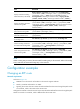
Clear statistics for multicast
forwarding events.
reset multicast [ vpn-instance vpn-instance-name ] forwarding event
Clear forwarding entries from
the multicast forwarding table.
reset multicast [ vpn-instance vpn-instance-name ] forwarding-table
{ { source-address [ mask { mask-length | mask } ] | group-address [ mask
{ mask-length | mask } ] | incoming-interface { interface-type
interface-number } } * | all }
Clear routing entries from the
multicast routing table.
reset multicast [ vpn-instance vpn-instance-name ] routing-table
{ { source-address [ mask { mask-length | mask } ] | group-address [ mask
{ mask-length | mask } ] | incoming-interface interface-type
interface-number } * | all }
NOTE:
W
hen a routin
g
entry is removed, the associated forwardin
g
entry is also removed. When a forwardin
g
entry is removed, the associated routing entry is also removed.
Configuration examples
Changing an RPF route
Network requirements
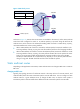
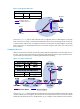
As shown in Figure 18:
• PIM-DM runs in the network. All switches in the network support multicast.
• Switch A, Switch B and Switch C run OSPF.
• Typically, the receiver host can receive the multicast data from the source through the path: Switch
A to Switch B, which is the same as the unicast route.
Configure the switches so that the receiver host receives the multicast data from Source through the path:
Switch A to Switch C to Switch B, which is different from the unicast route.