
R211x-HP Flexfabric 11900 IP Multicast Configuration Guide


44
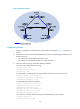
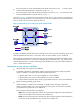
Figure 18 Network diagram
Configuration procedure
1. Assign an IP address and subnet mask for each interface according to Figure 18. (Details not
shown.)
2. Enable OSPF on the switches in the PIM-DM domain to make sure the following conditions are met:
(Details not shown.)
{ The switches are interoperable at the network layer.
{ The switches can dynamically update their routing information.
3. Enable IP multicast routing, and enable IGMP and PIM-DM:
# On Switch B, enable IP multicast routing.
<SwitchB> system-view
[SwitchB] multicast routing
[SwitchB-mrib] quit
# Enable IGMP on VLAN-interface 100 (the interface that connects to the receiver host).
[SwitchB] interface vlan-interface 100
[SwitchB-Vlan-interface100] igmp enable
[SwitchB-Vlan-interface100] quit
# Enable PIM-DM on the other interfaces.
[SwitchB] interface vlan-interface 101
[SwitchB-Vlan-interface101] pim dm
[SwitchB-Vlan-interface101] quit
[SwitchB] interface vlan-interface 102
[SwitchB-Vlan-interface102] pim dm
[SwitchB-Vlan-interface102] quit
# On Switch A, enable IP multicast routing, and enable PIM-DM on each interface.
<SwitchA> system-view
[SwitchA] multicast routing