
R211x-HP Flexfabric 11900 IP Multicast Configuration Guide

75
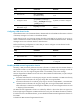
Task at a
g
lance
• (Required.) Configuring a C-BSR
• (Optional.) Configuring a PIM domain border
(Optional.) Disabling the BSM semantic fragmentation function
(Optional.) Configuring multicast source registration
(Optional.) Configuring switchover to SPT
(Optional.) Configuring common PIM features
Configuration prerequisites
Before you configure PIM-SM, configure a unicast routing protocol so that all devices in the domain are
interoperable at the network layer.
Enabling PIM-SM
Enable IP multicast routing before you configure PIM.
With PIM-SM enabled on interfaces, routers can establish PIM neighbor relationship and process PIM
messages from their PIM neighbors. When you deploy a PIM-SM domain, HP recommends that you
enable PIM-SM on all non-border interfaces.
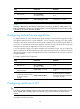
IMPORTANT:
A
ll the interfaces on the same router must operate in the same PIM mode in the public network or the same
V
PN instance.
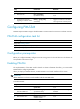
To enable PIM-SM:
Ste
p
Command Remarks
1. Enter system view.
system-view
N/A
2. Enable IP multicast routing
and enter MRIB view.
multicast routing [ vpn-instance
vpn-instance-name ]
By default, IP multicast routing is
disabled.
3. Return to system view.
quit N/A
4. Enter interface view.
interface interface-type
interface-number
N/A
5. Enable PIM-SM.
pim sm By default, PIM-SM is disabled.
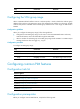
Configuring an RP
An RP can provide services for multiple or all multicast groups. However, only one RP can forward
multicast traffic for a multicast group at a moment.
An RP can be manually configured or dynamically elected through the BSR mechanism. For a
large-scaled PIM network, configuring static RPs is a tedious job. Generally, static RPs are backups for
dynamic RPs to enhance the robustness and operational manageability on a multicast network.