
R211x-HP Flexfabric 11900 IP Multicast Configuration Guide

88
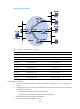
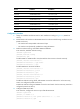
Figure 32 Network diagram
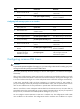
Table 6 Interface and IP address assignment
Device Interface IP address
Switch A VLAN-interface 100 10.110.1.1/24
Switch A VLAN-interface 103 192.168.1.1/24
Switch B VLAN-interface 200 10.110.2.1/24
Switch B VLAN-interface 101 192.168.2.1/24
Switch C VLAN-interface 200 10.110.2.2/24
Switch C VLAN-interface 102 192.168.3.1/24
Switch D VLAN-interface 300 10.110.5.1/24
Switch D VLAN-interface 103 192.168.1.2/24
Switch D VLAN-interface 101 192.168.2.2/24
Switch D VLAN-interface 102 192.168.3.2/24
Configuration procedure
1. Assign an IP address and subnet mask for each interface according to Figure 32. (Details not
shown.)
2. Configure OSPF on the switches in the PIM-DM domain to make sure the following conditions are
met: (Details not shown.)
{ The switches are interoperable at the network layer.
{ The switches can dynamically update their routing information.
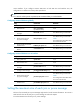
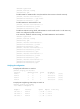
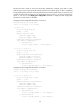
3. Enable IP multicast routing, IGMP, and PIM-DM:
# On Switch A, enable IP multicast routing.