
R211x-HP Flexfabric 11900 IRF Command Reference

8
Layer 4 traffic: destination-port, source-port
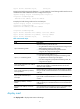
# Display the load sharing mode of IRF-port 1/1. In this example, a load sharing mode based on source
and destination MAC addresses has been configured on the port.
<Sysname> display irf-port load-sharing mode irf-port 1/1
irf-port1/1 Load-Sharing Mode:
destination-mac address, source-mac address
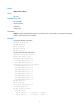
# Display the load sharing mode used on each IRF port.
<Sysname> display irf-port load-sharing mode irf-port
irf-port1/1 Load-Sharing Mode:
destination-mac address, source-mac address
irf-port1/2 Load-Sharing Mode:
Layer 2 traffic: destination-mac address, source-mac address
Layer 3 traffic: destination-ip address, source-ip address
Layer 4 traffic: destination-port, source-port
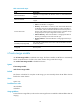
Table 5 Command output
Field Descri
p
tion
irf-port Load-Sharing Mode
Global load sharing mode for IRF links:
• If no global IRF link load sharing mode has been configured, the
default global load sharing mode applies.
• If a user-defined global load sharing mode has been
configured, the configured mode applies.
irf-port 1/1 Load-Sharing Mode
Link load sharing mode of IRF-port 1/1:
• If you have not configured a port-specific load sharing mode,
the global IRF link load sharing mode applies.
• If you have configured a port-specific load sharing mode, the
configured mode applies.
Layer 2 traffic: destination-mac address,
source-mac address
Default load sharing mode for traffic that has no IP header. By
default, this type of traffic is distributed based on source and
destination MAC addresses.
Layer 3 traffic: destination-ip address,
source-ip address
Default load sharing mode for non-TCP/-UDP IP packets. By default,
this type of traffic is distributed based on source and destination IP
addresses.
Layer 4 traffic: destination-port,
source-port
Default load sharing mode for TCP/UDP packets. By default, this
type of traffic is distributed based on source and destination port
numbers.
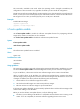
destination-ip address, source-ip
address
User-configured IRF link load sharing mode. In this sample output,
traffic on the IRF port is distributed based on source and destination
IP addresses.
destination-mac address, source-mac
address
User-configured IRF link load sharing criteria. In this sample output,
the criteria are source and destination MAC addresses.
display mad
Use display mad to display MAD status and settings.