
R211x-HP Flexfabric 11900 IRF Command Reference
12
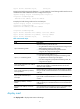
• The storage space of the device you are adding to the IRF fabric is sufficient for saving the new
software images.
• The information center outputs the software auto-update status to configuration terminals, which can
prevent the action of rebooting or swapping MPUs during the software auto-update process in a
multi-user environment. For more information about the information center, see Network
Management and Monitoring Configuration Guide.
If the device does not have enough storage space, it deletes the current software images automatically.
If the reclaimed space is still insufficient, the device cannot complete the auto-update, and you must
reboot the device and access the BootWare menus to delete files.
Examples
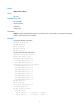
# Enable the software auto-update function.
<Sysname> system-view
[Sysname] irf auto-update enable
irf domain
Use irf domain to assign a domain ID to an IRF fabric.
Use undo irf domain to restore the default IRF domain setting.
Syntax
irf domain domain-id
undo irf domain
Default
IRF domain ID is 0.
Views
System view
Predefined user roles
network-admin
mdc-admin
Parameters
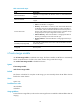
domain-id: Specifies a domain ID for the IRF fabric. The value range is 0 to 4294967295.
Usage guidelines
This command is available in IRF mode. Changing the operating mode from IRF to standalone can cause
loss of the IRF domain setting even if you have saved the configuration.
One IRF fabric forms one IRF domain. IRF uses IRF domain IDs to uniquely identify IRF fabrics and prevent
IRF fabrics from interfering with one another.
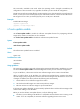
If you use one IRF fabric as the intermediate device for LACP MAD for another IRF fabric, assign the two
IRF fabrics different domain IDs for correct split detection. False detection causes IRF split.
An IRF fabric has only one IRF domain ID. You can change the IRF domain ID by using the irf domain or
mad enable command. The IRF domain IDs configured with these commands overwrite each other.