
R211x-HP Flexfabric 11900 IRF Command Reference
29
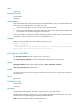
• enhanced: Sets the binding mode to enhanced.
• normal: Sets the binding mode to normal.
Usage guidelines
In IRF mode, use the shutdown command to shut down a physical port before you bind it to or remove it
from an IRF port. To bring up the physical port after a binding or binding removal operation, use the
undo shutdown command.
In standalone mode, the shutdown and undo shutdown operations are not required.
Repeat the port group interface command to bind up to eight physical ports to an IRF port for link
redundancy.
The binding mode takes effect only when the physical port is bound to an IRF port. Make sure the two
ends of an IRF link use the same binding mode. To use EVB, TRILL, MPLS L2VPN, or VPLS in the IRF fabric,
you must configure the IRF physical ports to operate in enhanced mode.
The system does not dynamically remove the binding between a physical port and an IRF port even if the
IRF link has been lost. For example, this situation occurs when the interface card holding the physical port
is removed. To remove the binding, use the undo port group interface command.
For more information about IRF port binding requirements, see IRF Configuration Guide.
Examples
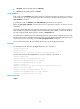
# In standalone mode, bind port Ten-GigabitEthernet 2/0/1 to IRF-port 1.
<Sysname> system-view
[Sysname] irf-port 1
[Sysname-irf-port1] port group interface ten-gigabitethernet 2/0/1
# In IRF mode, bind port Ten-GigabitEthernet 1/2/0/1 to IRF-port 1 of member 1.
<Sysname> system-view
[Sysname] interface ten-gigabitethernet 1/2/0/1
[Sysname-Ten-GigabitEthernet1/2/0/1] shutdown
[Sysname-Ten-GigabitEthernet1/2/0/1] quit
[Sysname] irf-port 1/1
[Sysname-irf-port1/1] port group interface ten-gigabitethernet 1/2/0/1
[Sysname-irf-port1/1] quit
[Sysname] interface ten-gigabitethernet 1/2/0/1
[Sysname-Ten-GigabitEthernet1/2/0/1] undo shutdown
[Sysname-Ten-GigabitEthernet1/2/0/1] quit
Related commands
irf-port