
R211x-HP Flexfabric 11900 IRF Command Reference

2
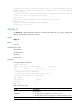
The device will switch to stand-alone mode and reboot. You are recommended to save the
current running configuration and specify the configuration file for the next startup.
Continue? [Y/N]:y
Do you want to convert the content of the next startup configuration file flash:/startup.cfg
to make it available in stand-alone mode? [Y/N]:y
Please wait...
Saving the converted configuration file to the main board succeeded.
Chassis 2 Slot 1:
Saving the converted configuration file succeeded.
Now rebooting, please wait...
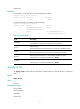
display irf
Use display irf to display IRF fabric information, including the member ID, role, priority, bridge MAC
address, and description of each IRF member.
Syntax
display irf
Views
Any view
Predefined user roles
network-admin
network-operator
mdc-admin
mdc-operator
Examples
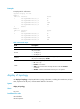
# Display IRF fabric information.
<Sysname> display irf
MemberID Slot Role Priority CPU-Mac Description
*+1 0 Master 1 0210-fc03-0007 -----
--------------------------------------------------
* indicates the device is the master.
+ indicates the device through which the user logs in.
The Bridge MAC of the IRF is: 3ce5-a6b8-3800
Auto upgrade : yes
Mac persistent : always
Domain ID : 0
Auto merge : no
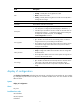
Table 1 Command output
Field Descri
p
tion
MemberID
IRF member ID:
• ID of the master is prefixed with an asterisk (*) sign.
• ID of the device where you are logged in is prefixed with a plus (+) sign.
Slot MPU slot number.