
R211x-HP Flexfabric 11900 IRF Command Reference

3
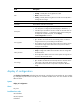
Field Descri
p
tion
Role
Role of the MPU in the IRF fabric:
• Standby—Standby MPU for the global active MPU.
• Master—Global active MPU.
• Loading—Standby MPU for the global active MPU. The standby MPU is
loading software images.
Priority IRF member priority.
CPU-MAC MAC address of the CPU on the MPU.
Description
Description you have configured for the member device.
• If no description is configured, this field displays a dashed line (-----).
• If the description exceeds the maximum number of characters that can
be displayed, an ellipsis (…) is displayed in place of the exceeding text.
To display the complete description, use the display
current-configuration command.
Auto upgrade
Status of the software auto-update function:
• yes—Enabled. The master device automatically pushes its software
images to the device you are adding to the IRF fabric.
• no—Disabled. You must manually make sure the joining device uses the
same software images as the master device. If not, the new device
cannot join the IRF fabric.
MAC persistent
IRF bridge MAC persistence setting:
• always—Bridge MAC address of the IRF fabric does not change after
the master leaves.
• no—Bridge MAC address of the new master replaces the original one
as soon as the old master leaves.
Auto merge
State of the auto merge function:
• yes—Enabled. The IRF fabric automatically reboots its member devices
when it fails in the master election during an IRF fabric merge.
• no—Disabled. Manual reboot is required to complete an IRF fabric
merge.
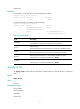
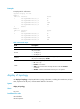
display irf configuration
Use display irf configuration to display basic IRF settings, including the current member ID, new member
ID, and physical ports bound to the IRF ports on each IRF member device. The new member IDs take
effect at reboot.
Syntax
display irf configuration
Views
Any view
Predefined user roles
network-admin
network-operator
mdc-admin