
R211x-HP Flexfabric 11900 Layer 2 - LAN Switching Command Reference

5
Usage guidelines
The statistics cover only interfaces in up state.
If an interface type is specified, the command displays traffic rate statistics for all up interfaces of the
specified type over the last statistics polling interval.
If no interface type is specified, the command displays traffic rate statistics for all up interfaces that have
traffic counters over the last statistics polling interval.
If an interface which is always down over the last statistics polling interval is specified, the system prompts
that the interface does not support the command.
You can use the flow-interval command to set the statistics polling interval.
Examples
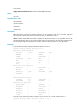
# Display the inbound traffic rate statistics for all Ten-GigabitEthernet interfaces.
<Sysname> display counters rate inbound interface ten-gigabitethernet
Interface Total (pps) Broadcast (pps) Multicast (pps)
XGE1/0/1 200 -- --
XGE1/0/2 300 -- --
XGE1/0/3 300 -- --
Overflow: More than 14 digits.
--: Not supported.
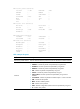
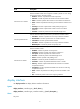
Table 2 Command output
Field Description
Interface Abbreviated interface name.
Total (pkts/sec)
Average rate (in pps) of receiving or sending packets during the statistics
polling interval.
Broadcast (pkts/sec)
Average rate (in pps) of receiving or sending broadcast packets during the
statistics polling interval.
Multicast (pkts/sec)
Average rate (in pps) of receiving or sending multicast packets during the
statistics polling interval.
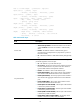
Overflow: more than 14
decimal digits
The command displays Overflow if the data length of a statistical item is
greater than 14 decimal digits.
--: not supported The statistical item is not supported.
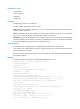
Related commands
• flow-interval
• reset counters interface
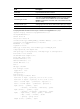
display ethernet statistics
Use display ethernet statistics to display the Ethernet statistics.
Syntax
In standalone mode:
display ethernet statistics slot slot-number