
R211x-HP Flexfabric 11900 Layer 2 - LAN Switching Command Reference


185
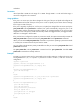
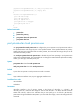
VLAN ID: 3
VLAN type: Static
Private VLAN type: Secondary
Route interface: Configured
Description: VLAN 0003
Name: VLAN 0003
Tagged ports: None
Untagged ports:
Ten-GigabitEthernet1/0/2 Ten-GigabitEthernet1/0/3
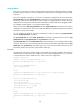
VLAN ID: 4
VLAN type: Static
Private VLAN type: Secondary
Route interface: Not configured
Description: VLAN 0004
Name: VLAN 0004
Tagged ports: None
Untagged ports:
Ten-GigabitEthernet1/0/2 Ten-GigabitEthernet1/0/4
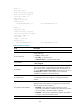
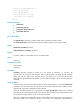
Table 41 Output description
Field Descri
p
tion
VLAN type VLAN type: Dynamic or Static.
Private VLAN type
Private VLAN type:
• Primary—Primary VLAN.
• Secondary—Secondary VLAN.
• Isolated secondary—Isolated secondary VLAN.
Route interface
Indicates whether a VLAN interface is created for the VLAN: Configured
or Not configured.
IPv4 address
Primary IPv4 address of the VLAN interface. This field is not displayed
when no IPv4 address is configured for the VLAN interface. When the
VLAN interface is also configured with secondary IPv4 addresses, you
can use the display interface vlan-interface command in any view or use
the display this command in VLAN interface view to display the
secondary IPv4 addresses of the VLAN interface.
IPv4 subnet mask
Subnet mask for the primary IPv4 address of the VLAN interface. This field
is not displayed when no IPv4 address is configured for the VLAN
interface.
IPv6 global unicast addresses
Global unicast IPv6 address of the VLAN interface. This field is not
displayed when no IPv6 address is configured for the VLAN interface.
The IPv6 address states are as follows:
• TENTATIVE—Initial state. DAD is being performed or is to be
performed on the address. An address in this state cannot be used as
the source address or destination address of packets.
• DUPLICATE—DAD has been completed for the address. The address is
not unique on the link and cannot be used.
Description VLAN description.