
R211x-HP Flexfabric 11900 Layer 2 - LAN Switching Command Reference


186
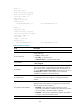
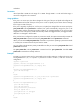
Field Descri
p
tion
Name VLAN name.
Tagged ports Ports through which packets from the VLAN are sent with tags.
Untagged ports Ports through which packets from the VLAN are sent without tags.
Related commands
• private-vlan
• private-vlan primary
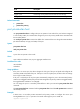
port private-vlan host
Use port private-vlan host to configure the port to operate in host mode. If the port has been assigned
to a secondary VLAN, the command also assigns the port to the primary VLAN that is associated with
the secondary VLAN.
Use undo port private-vlan to restore the default. The command does not change the VLAN attributes
(the allowed VLANs, link type, and PVID) of the port.
Syntax
port private-vlan host
undo port private-vlan
Default
A port does not operate in host mode.
Views
Layer 2 Ethernet interface view, Layer 2 aggregate interface view
Predefined user roles
network-admin
mdc-admin
Usage guidelines
If the port is an access port, the device changes the link type of the port to hybrid and configures the
secondary VLAN as the PVID of the port. If the port is a trunk or hybrid port, the device does not change
the link type or PVID of the port.
If the port is a hybrid port at last, the system automatically assigns the port to the associated primary
VLAN as an untagged member (if the port has been assigned to the primary VLAN as a tagged member,
the tagged member attribute is not changed).
You can assign the port to a secondary VLAN before or after you execute the port private-vlan host
command.
The port private-vlan host command and the port private-vlan vlan-id-list trunk promiscuous command
are mutually exclusive.
Examples
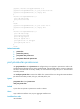
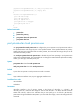
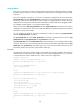
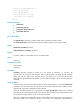
# VLAN 20 is a secondary VLAN associated with primary VLAN 2. Configure the access port
Ten-GigabitEthernet 1/0/1 to operate in host mode and assign the port to VLAN 20.
<Sysname> system-view