
R211x-HP Flexfabric 11900 Layer 2 - LAN Switching Command Reference

194
QinQ commands
This document uses the following terms:
• CVLAN—Customer network VLANs, also called "inner VLANs," refer to VLANs that a customer
uses on the private network.
• SVLAN—Service provider network VLANs, also called "outer VLANs," refer to VLANs that a service
provider uses to transmit VLAN tagged traffic for customers.
display qinq
Use display qinq to display the QinQ-enabled interfaces.
Syntax
display qinq [ interface interface-type interface-number ]
Views
Any view
Predefined user roles
network-admin
network-operator
mdc-admin
mdc-operator
Parameters
interface interface-type interface-number: Displays whether QinQ is enabled on an interface specified
by its type and number. If no interface is specified, this command displays all QinQ-enabled interfaces.
Usage guidelines
If QinQ is not enabled on any interface, this command does not provide any output.
Examples
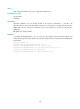
# Enable QinQ on interface Ten-GigabitEthernet 1/0/1. Then verify whether QinQ is enabled on the
interface.
<Sysname> system-view
[Sysname] interface ten-gigabitethernet 1/0/1
[Sysname-Ten-GigabitEthernet1/0/1] qinq enable
[Sysname-Ten-GigabitEthernet1/0/1] display qinq interface ten-gigabitethernet 1/0/1
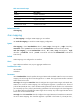
Interface
Ten-GigabitEthernet1/0/1
# Enable QinQ on interfaces Ten-GigabitEthernet 1/0/1 and Ten-GigabitEthernet 1/0/3. Then display
all QinQ-enabled interfaces.
<Sysname> system-view
[Sysname] interface ten-gigabitethernet 1/0/1
[Sysname-Ten-GigabitEthernet1/0/1] qinq enable