
R211x-HP Flexfabric 11900 Layer 2 - LAN Switching Command Reference
197
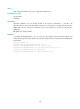
[Sysname] qinq ethernet-type customer-tag 8200
qinq ethernet-type service-tag
Use qinq ethernet-type service-tag to configure the SVLAN TPID.
Use undo qinq ethernet-type service-tag to restore the default SVLAN TPID.
Syntax
qinq ethernet-type service-tag hex-value
undo qinq ethernet-type service-tag
Default
The SVLAN TPID is 0x8100.
Views
Layer 2 Ethernet interface view, Layer 2 aggregate interface view
Predefined user roles
network-admin
mdc-admin
Parameters
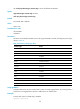
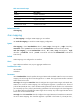
hex-value: Sets a hexadecimal TPID value in the range of 0x0001 to 0xFFFF, excluding the protocol type
values in Table 43.
Usage guidelines
TPID identifies a frame as an 802.1Q tagged frame.
A service provider-side port uses the SVLAN TPID to re-mark the TPID in outgoing frames' SVLAN tags, in
addition to matching incoming tagged frames.
Examples
# Set the SVLAN TPID to 0x9100 on Ten-GigabitEthernet 1/0/1.
<Sysname> system-view
[Sysname] interface ten-gigabitethernet 1/0/1
[Sysname- Ten-GigabitEthernet1/0/1] qinq ethernet-type service-tag 9100
qinq transparent-vlan
Use qinq transparent-vlan to configure transparent transmission for the specified VLANs on a port, so the
port can transparently transmit frames from the specified VLANs.
Use undo qinq transparent-vlan to remove the transparent transmission configuration for the specified
VLANs on a port.
Syntax
qinq transparent-vlan vlan-id-list
undo qinq transparent-vlan { vlan-id-list | all }
Default
Transparent transmission is not configured for any VLAN on a port.