
R211x-HP Flexfabric 11900 Layer 2 - LAN Switching Command Reference


222
The number of CDP error frames : 0
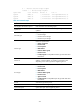
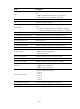
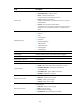
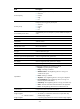
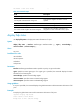
Table 47 Command output
Field Descri
p
tion
LLDP statistics global information Global LLDP statistics.
LLDP neighbor information last change time
Time when the neighbor information was last
updated.
The number of LLDP neighbor information inserted Number of times neighbor information was added.
The number of LLDP neighbor information deleted Number of times neighbor information was removed.
The number of LLDP neighbor information dropped
Number of times of neighbor information was
dropped due to lack of available memory space.
display lldp status
Use display lldp status to display LLDP status information of a port.
Syntax
display lldp status [ interface interface-type interface-number ] [ agent { nearest-bridge |
nearest-customer | nearest-nontpmr } ]
Views
Any view
Predefined user roles
network-admin
network-operator
mdc-admin
mdc-operator
Parameters
interface interface-type interface-number: Specifies a port by its type and number.
agent: Specifies an LLDP agent type. If no agent type is specified, the command displays the status
information for all LLDP agents.
nearest-bridge: Specifies nearest bridge agents.
nearest-customer: Specifies nearest customer bridge agents.
nearest-nontpmr: Specifies nearest non-TPMR bridge agents.
Usage guidelines
If no port is specified, this command displays the global LLDP status and the LLDP status information of all
ports.
Examples
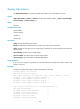
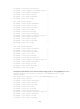
# Display the global LLDP status and the LLDP status information of all ports.
<Sysname> display lldp status
Global status of LLDP: Enable
Bridge mode of LLDP: customer-bridge