
R211x-HP Flexfabric 11900 Layer 2 - LAN Switching Command Reference

19
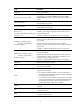
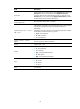
Field Description
Cause
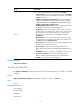
Cause for the physical link state of an interface to be DOWN:
• Administratively—The port is manually shut down with the shutdown
command. To restore the physical state of the interface, use the undo
shutdown command.
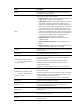
• DOWN ( Link-Aggregation interface down )—When an aggregate
interface is shut down, the physical state of all member ports of the
aggregate interface becomes DOWN, and the Cause field displays
DOWN ( Link-Aggregation interface down ).
• DOWN (Loopback detection down)—The port is shut down because
the loopback detection module has detected loops.
• IRF-link-down—When the link detection function of IRF detects that
the IRF link is down on an MDC of a member device, the state of all
physical interfaces except the excluded ports on the MDC of the
member device is set to DOWN, and the Cause field displays
IRF-link-down.
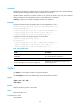
• MAD ShutDown—After an IRF split, the state of all interfaces except
the excluded ports in the IRF in recovery state is set to DOWN, and
the Cause field displays MAD ShutDown.
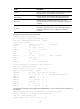
• Not connected—No physical connection exists (possibly because the
network cable is disconnected or faulty).
• Storm-Constrain—The port is shut down because the unknown
unicast traffic, multicast traffic, or broadcast traffic exceeds the upper
limit.
• STP DOWN—The port is shut down by the STP BPDU guard function.
• Port Security Disabled—The port is shut down by the intrusion
detection mechanism because the port receives illegal packets.
• Standby—The interface is in the Standby state.
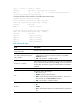
Related commands
reset counters interface
display packet-drop
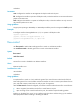
Use display packet-drop to display information about packets dropped on an interface or multiple
interfaces.
Syntax
display packet-drop { interface [ interface-type [ interface-number ] ] | summary }
Views
Any view
Predefined user roles
network-admin
network-operator
mdc-admin
mdc-operator