
R211x-HP Flexfabric 11900 Layer 2 - LAN Switching Command Reference


32
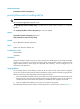
Parameters
slot slot-number: Clears the Ethernet statistics on the specified card. The slot-number argument represents
the number of the slot that houses the card. (In standalone mode.)
chassis chassis-number slot slot-number: Clears the Ethernet statistics on the specified card of the
specified IRF member device. The chassis-number argument represents the ID of the IRF member device.
The slot-number argument represents the number of the slot that houses the card. (In IRF mode.)
Examples
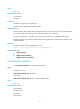
# (In standalone mode.) Clear the Ethernet statistics on slot 6.
<Sysname> reset ethernet statistics slot 6
# (In IRF mode.) Clear the Ethernet statistics on the card in slot 1 of IRF member device 1.
<Sysname> reset ethernet statistics chassis 1 slot 1
reset packet-drop interface
Use reset packet-drop interface to clear the dropped packet statistics on an interface or multiple
interfaces.
Syntax
reset packet-drop interface [ interface-type [ interface-number ] ]
Views
User view
Predefined user roles
network-admin
mdc-admin
Parameters
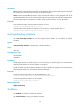
interface-type: Specify an interface type. If you do not specify an interface type, this command clears
dropped packet statistics on all the interfaces on the device.
interface-number: Specify an interface number. If you do not specify this argument, this command clears
dropped packet statistics on all interfaces of the specified type.
Examples
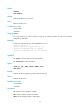
# Clear dropped packet statistics on Ten-GigabitEthernet 1/0/1.
<Sysname> reset packet-drop interface ten-gigabitethernet1/0/1
# Clear dropped packet statistics on all interfaces.
<Sysname> reset packet-drop interface
Related commands
display packet-drop
shutdown
Use shutdown to shut down an Ethernet interface.
Use undo shutdown to bring up an Ethernet interface.