
R211x-HP Flexfabric 11900 Layer 2 - LAN Switching Command Reference


34
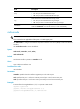
10000: Sets the interface speed to 10000 Mbps.
40000: Sets the interface speed to 40000 Mbps.
auto: Enables the interface to negotiate a speed with its peer.
Usage guidelines
For a copper Ethernet interface, use the speed command to set its speed to match the rate of its peer.
For a fiber port, use the speed command to set its speed to match the rate of a transceiver module.
Table 10 sho
ws the support of interfaces for the keywords.
Table 10 Interface speeds
Interface Supported keywords
40-GE QSFP+ interface 40000 and auto
10-GE SFP+ interface 1000, 10000, and auto
10-GE copper port 100, 1000, 10000, and auto
Examples
# Configure Ten-GigabitEthernet 1/0/1 to autonegotiate the speed.
<Sysname> system-view
[Sysname] interface ten-gigabitethernet 1/0/1
[Sysname-Ten-GigabitEthernet1/0/1] speed auto
Related commands
speed auto
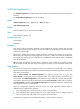
using fortygige
IMPORTANT:
This command is not applicable to non-default MDCs.
Use using fortygige to combine four 10-GE interfaces that are split from a 40-GE QSFP+ interface into
a 40-GE interface.
Use undo using fortygige to cancel the configuration.
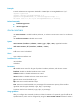
Syntax
using fortygige
undo using fortygige
Default
A 40-GE interface is not split and operates as a single interface.
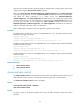
Views
Split 10-GE interface view
Predefined user roles
network-admin
mdc-admin