
R211x-HP Flexfabric 11900 Layer 2 - LAN Switching Command Reference

77
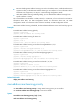
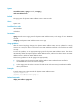
[Sysname] interface ten-gigabitethernet 1/0/1
[Sysname-Ten-GigabitEthernet1/0/1] mac-address max-mac-count 600
Related commands
• mac-address
• mac-address max-mac-count enable-forwarding
mac-address max-mac-count enable-forwarding
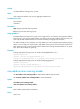
Use mac-address max-mac-count enable-forwarding to enable the device to forward frames with
unknown source MAC addresses after the number of learned MAC addresses reaches the upper limit.
Use undo mac-address max-mac-count enable-forwarding to disable the device from forwarding
frames with unknown source MAC addresses after the number of learned MAC addresses reaches the
upper limit.
Syntax
mac-address max-mac-count enable-forwarding
undo mac-address max-mac-count enable-forwarding
Default
When the upper limit is reached, the received frames with unknown source MAC addresses are
forwarded.
Views
Layer 2 Ethernet interface view
Predefined user roles
network-admin
mdc-admin
Examples
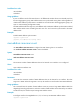
# Configure Ten-GigabitEthernet 1/0/1 to learn up to 600 MAC address entries. Disable the device
from forwarding frames with unknown source MAC addresses after the number of learned MAC
addresses reaches the upper limit.
<Sysname> system-view
[Sysname] interface ten-gigabitethernet 1/0/1
[Sysname-Ten-GigabitEthernet1/0/1] mac-address max-mac-count 600
[Sysname-Ten-GigabitEthernet1/0/1] undo mac-address max-mac-count enable-forwarding
Related commands
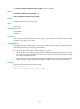
• mac-address
• mac-address max-mac-count
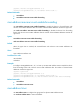
mac-address timer
Use mac-address timer to configure the aging timer for dynamic MAC address entries.
Use undo mac-address timer to restore the default.