
R211x-HP Flexfabric 11900 Layer 2 - LAN Switching Configuration Guide

3
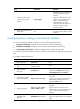
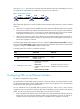
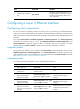
Step Command Remarks
3. Combine the four 10-GE
interfaces into a 40-GE
interface.
using fortygige
By default, a 40-GE interface is not
split and operates as a single
interface.
After you combine the four 10-GE
interfaces, use a dedicated 1-to-1
cable or a 40-GE transceiver
module and fiber. For more
information about the cable and
transceiver module, see the
installation guide.
4. Reboot the card that houses
the interface.
N/A
After creating the 40-GE interface,
the system removes the four 10-GE
interfaces.
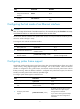
Configuring basic settings of an Ethernet interface
You can set an Ethernet interface to operate in one of the following duplex modes:
• Full-duplex mode (full)—Interfaces can send and receive packets simultaneously.
• Half-duplex mode (half)—Interfaces cannot send and receive packets simultaneously.
• Autonegotiation mode (auto)—Interfaces negotiate a duplex mode with their peers.
You can set the speed of an Ethernet interface or enable it to automatically negotiate a speed with its
peer.
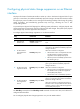
To configure an Ethernet interface:
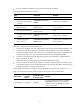
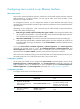
Step Command Remarks
1. Enter system view.
system-view N/A
2. Enter Ethernet interface
view.
interface interface-type
interface-number
N/A
3. Set the interface
description.
description text
The default setting is in the format of
interface-name Interface. For example,
Ten-GigabitEthernet1/0/1 Interface.
4. Set the duplex mode of
the Ethernet interface.
duplex { auto | full | half }
By default, Ethernet interfaces operate in
auto mode.
Copper ports operating at 1000 Mbps or
10000 Mbps and fiber ports do not
support the half keyword.
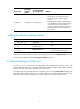
5. Set the port speed.
speed { 10 | 100 | 1000 |
10000 | 40000 | auto }
The default setting is auto for Ethernet
interfaces.
Support for the keywords varies with
interface types. For more information, see
Layer 2—LAN Switching Command
Reference.
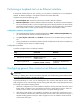
6. Configure the expected
bandwidth of the
interface.
bandwidth bandwidth-value
By default, the expected bandwidth (in
kbps) is the interface baud rate divided by
1000.