
R211x-HP Flexfabric 11900 Layer 2 - LAN Switching Configuration Guide

105
Port status auto recovery
Port status auto recovery applies only to the block and no-learning loop protection actions. If the device
receives no loop detection frame three loop detection intervals after a loop is detected on a port, the
device does the following:
• Automatically sets the port to the forwarding state.
• Notifies the user of the event.
NOTE:
Incorrect recovery can occur when loop detection frames are discarded to reduce the load. To avoid this,
use the shutdown action, or manually remove the loop.
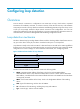
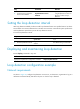
Loop detection configuration task list
Tasks at a
g
lance
(Required.) Enabling loop detection
(Optional.) Configuring the loop protection action
(Optional.) Setting the loop detection interval
Enabling loop detection
You can enable loop detection globally or on specific ports. The global configuration applies to all ports
in the specified VLAN. The per-port configuration applies to the individual port only when the port
belongs to the specified VLAN. Per-port configurations take precedence over global configurations.
HP recommends not enabling loop detection on TRILL ports, because TRILL networks prevent loops from
being generated. For information more about TRILL, see TRILL Configuration Guide.
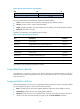
Enabling loop detection globally
Ste
p
Command
Remarks
1. Enter system view.
system-view N/A
2. Globally enable loop
detection.
loopback-detection global enable
vlan { vlan-list | all }
Disabled by default.
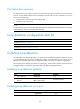
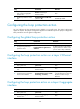
Enabling loop detection on a port
Ste
p
Command
Remarks
1. Enter system view.
system-view N/A