
R211x-HP Flexfabric 11900 Layer 2 - LAN Switching Configuration Guide

106
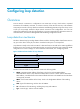
Ste
p
Command
Remarks
2. Enter Layer 2 Ethernet interface
view or Layer 2 aggregate
interface view.
interface interface-type
interface-number
N/A
3. Enable loop detection on the
port.
loopback-detection enable vlan
{ vlan-list | all }
Disabled by default.
Configuring the loop protection action
You can configure the loop protection action globally or on specific ports. The global configuration
applies to all ports. The per-port configuration applies to the individual ports. The per-port configuration
takes precedence over the global configuration.
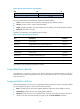
Configuring the global loop protection action
Ste
p
Command
Remarks
1. Enter system view.
system-view N/A
2. Configure the global loop
protection action.
loopback-detection global action
shutdown
By default, the device generates a
log but performs no action on the
port on which a loop is detected.
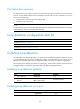
Configuring the loop protection action on a Layer 2 Ethernet
interface
Ste
p
Command
Remarks
1. Enter system view.
system-view N/A
2. Enter Layer 2 Ethernet interface
view.
interface interface-type
interface-number
N/A
3. Configure the loop protection
action on the interface.
loopback-detection action { block |
no-learning | shutdown }
By default, the device generates
a log but performs no action on
the port on which a loop is
detected.
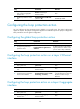
Configuring the loop protection action on a Layer 2 aggregate
interface
Ste
p
Command
Remarks
1. Enter system view.
system-view
N/A
2. Enter Layer 2 aggregate
interface view.
interface bridge-aggregation
interface-number
N/A