
R211x-HP Flexfabric 11900 Layer 2 - LAN Switching Configuration Guide

107
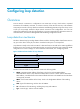
Ste
p
Command
Remarks
3. Configure the loop protection
action on the interface.
loopback-detection action
shutdown
By default, the device generates
a log but performs no action on
the port on which a loop is
detected.
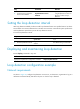
Setting the loop detection interval
With loop detection enabled, the device sends loop detection frames at a specified interval. A shorter
interval offers more sensitive detection but consumes more resources. Consider the system performance
and loop detection speed when you set the loop detection interval.
To set the loop detection interval:
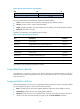
Ste
p
Command
Remarks
1. Enter system view.
system-view N/A
2. Set the loop detection interval.
loopback-detection interval-time
interval
The default setting is 30 seconds.
Displaying and maintaining loop detection
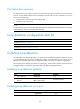
Execute display commands in any view.
Task Command
Display the loop detection configuration and status. display loopback-detection
Loop detection configuration example
Network requirements
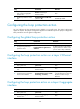
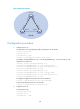
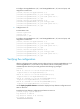
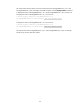
As shown in Figure 29, configure loop detection on Device A, so that Device A generates a log as a
notification and automatically shuts down the port on which a loop is detected.