
R211x-HP Flexfabric 11900 Layer 2 - LAN Switching Configuration Guide

146
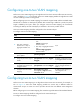
Task Remarks
Configuring one-to-one VLAN mapping
Configure one-to-one VLAN mapping on the wiring-closet
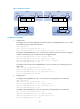
switch as shown in Figure 40.
Configuring one-to-two VLAN mapping
Configure one-to-two VLAN mapping on PE1 and PE4,
through which traffic from customer networks enter the service
provider networks, as shown in Figure 41.
Configuring two-to-two VLAN mapping
Configure two-to-two VLAN mapping on PE3, edge device of
the SP 2 network, as shown in Figure 41.
Configuring one-to-one VLAN mapping
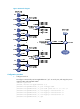
Perform one-to-one VLAN mapping on wiring-closet switches (see Figure 40) to isolate traffic of the same
service type from different homes.
Before configuring one-to-one VLAN mapping, first create the original VLAN and the translated VLAN.
One-to-one VLAN mapping should be configured on the customer-side port.
To configure one-to-one VLAN mapping:
Ste
p
Command
Remarks
1. Enter system view.
system-view N/A
2. Enter Layer 2 Ethernet
interface view or Layer 2
aggregate interface view.
• Enter Layer 2 Ethernet interface
view:
interface interface-type
interface-number
• Enter Layer 2 aggregate interface
view:
interface bridge-aggregation
interface-number
N/A
3. Set the link type of the port.
• Configure the port as a trunk port:
port link-type trunk
• Configure the port as a hybrid
port:
port link-type hybrid
By default, the link type of a
port is access.
4. Assign the port to the original
VLANs and the translated
VLANs.
• port trunk permit vlan vlan-id-list
• port hybrid vlan vlan-id-list tagged
By default, a trunk port is
assigned to only VLAN 1, and
a hybrid port is only an
untagged member of VLAN 1.
5. Configuring one-to-one VLAN
mapping.
vlan mapping vlan-id translated-vlan
vlan-id
By default, VLAN mapping is
not configured on an interface.