
R211x-HP Flexfabric 11900 Layer 2 - LAN Switching Configuration Guide

151
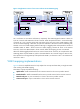
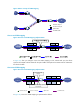
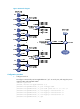
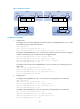
Figure 47 Network diagram
Configuration procedure
1. Configure PE 1:
# Configure one-to-two VLAN mapping on customer-side port Ten-GigabitEthernet 1/0/1 to add
outer VLAN tag 100 to packets from VLAN 5.
<PE1> system-view
[PE1] interface ten-gigabitethernet 1/0/1
[PE1-Ten-GigabitEthernet1/0/1] vlan mapping nest single 5 nested-vlan 100
# Configure Ten-GigabitEthernet 1/0/1 as a hybrid port, assign the port to VLAN 5 as a tagged
member, and assign the port to VLAN 100 as an untagged member.
[PE1-Ten-GigabitEthernet1/0/1] port link-type hybrid
[PE1-Ten-GigabitEthernet1/0/1] port hybrid vlan 5 tagged
[PE1-Ten-GigabitEthernet1/0/1] port hybrid vlan 100 untagged
[PE1-Ten-GigabitEthernet1/0/1] quit
# Configure network-side port Ten-GigabitEthernet 1/0/2 as a trunk port, and assign the port to
VLAN 100.
[PE1] interface ten-gigabitethernet 1/0/2
[PE1-Ten-GigabitEthernet1/0/2] port link-type trunk
[PE1-Ten-GigabitEthernet1/0/2] port trunk permit vlan 100
[PE1-Ten-GigabitEthernet1/0/2] quit
2. Configure PE 2:
# Configure Ten-GigabitEthernet 1/0/1 as a trunk port, and assign the port to VLAN 100.
<PE2> system-view
[PE2] interface ten-gigabitethernet 1/0/1
[PE2-Ten-GigabitEthernet1/0/1] port link-type trunk
[PE2-Ten-GigabitEthernet1/0/1] port trunk permit vlan 100
[PE2-Ten-GigabitEthernet1/0/1] quit
# Configure Ten-GigabitEthernet 1/0/2 as a trunk port, and assign the port to VLAN 100.
[PE2] interface ten-gigabitethernet 1/0/2
[PE2-Ten-GigabitEthernet1/0/2] port link-type trunk
[PE2-Ten-GigabitEthernet1/0/2] port trunk permit vlan 100
[PE2-Ten-GigabitEthernet1/0/2] quit
PE 1
SP 1
SP 2
PE 2 PE 3 PE 4
XGE1/0/1
XGE1/0/2
XGE1/0/1 XGE1/0/2
XGE1/0/1 XGE1/0/2 XGE1/0/1
XGE1/0/2
VPN A
Site 1
CE 1
CE 2
VPN A
Site 2
DataVLAN 5
DataVLAN 100 VLAN 5 DataVLAN 200 VLAN 6
DataVLAN 6