
R211x-HP Flexfabric 11900 Layer 2 - LAN Switching Configuration Guide

9
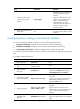
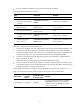
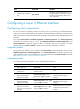
flow-control
priority-flo
w-control
enable
priority-flow-contr
ol no-drop dot1p
Remarks
Configured Configurable Unconfigurable
• On a port configured with the flow-control
command, you can enable PFC, but you
cannot enable PFC for specific 802.1p
priorities.
• Enabling both generic flow control and PFC on
a port disables the port from sending common
or PFC pause frames to inform the peer of
congestion conditions. However, the port can
still handle common and PFC pause frames
from the peer.
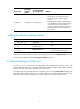
Setting the statistics polling interval
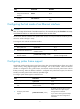
Step Command Remarks
1. Enter system view.
system-view N/A
2. Enter Ethernet interface
view.
interface interface-type
interface-number
N/A
3. Set the statistics polling
interval.
flow-interval interval
By default, the interface statistics
polling interval is 300 seconds.
To display the interface statistics collected in the last polling interval, use the display interface command.
To clear interface statistics, use the reset counters interface command.
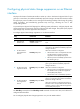
Forcibly bringing up a fiber port
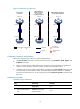
As shown in Figure 2, a fiber port uses separate fibers for transmitting and receiving packets. The
physical state of the fiber port is up only when both transmit and receive fibers are physically connected.
If one of the fibers is disconnected, the fiber port does not work.
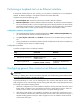
To enable a fiber port to forward traffic over a single link, you can use the port up-mode command. This
command brings up a fiber port by force, even when no fiber links or optical modules are present. If one
fiber link is present and up, the fiber port can forward packets over the link unidirectionally.