
R211x-HP Flexfabric 11900 Layer 2 - LAN Switching Configuration Guide


162
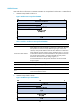
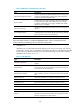
Step Command Remarks
2. Enter Layer 2 or Layer 3
Ethernet interface view or
Layer 2 aggregate interface
view.
interface interface-type interface-number N/A
3. Set the LLDP operating
mode.
• In Layer 2 or Layer 3 Ethernet interface
view:
lldp [ agent { nearest-customer |
nearest-nontpmr } ] admin-status
{ disable | rx | tx | txrx }
• In Layer 2 aggregate interface view:
lldp agent { nearest-customer |
nearest-nontpmr } admin-status { disable
| rx | tx | txrx }
By default, the nearest
bridge agent operates in
txrx mode, and the nearest
customer bridge agent and
nearest non-TPMR bridge
agent operate in disable
mode.
In Ethernet interface view, if
no agent type is specified,
the command configures
the operating mode for
nearest bridge agents.
In aggregate interface
view, you can configure the
operating mode for only
nearest customer bridge
agents and nearest
non-TPMR bridge agents.
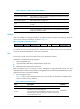
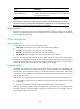
Setting the LLDP re-initialization delay
When LLDP operating mode changes on a port, the port initializes the protocol state machines after a
certain delay. By adjusting the LLDP re-initialization delay, you can avoid frequent initializations caused
by frequent changes to the LLDP operating mode on a port.
To set the LLDP re-initialization delay for ports:
Ste
p
Command
Remarks
1. Enter system view.
system-view N/A
2. Set the LLDP re-initialization
delay.
lldp timer reinit-delay delay The default setting is 2 seconds.
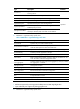
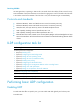
Enabling LLDP polling
With LLDP polling enabled, a device periodically searches for local configuration changes. When the
device detects a configuration change, it sends LLDPDUs to inform neighboring devices of the change.
To enable LLDP polling:
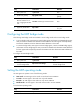
Step Command Remarks
1. Enter system view.
system-view N/A