
R211x-HP Flexfabric 11900 Layer 2 - LAN Switching Configuration Guide

10
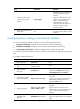
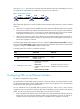
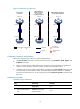
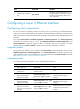
Figure 2 Forcibly bring up a fiber port
Configuration restrictions and guidelines
When you forcibly bring up a fiber port, follow these guidelines:
• The port up-mode command is mutually exclusive with any of the shutdown, speed, duplex, and
loopback commands.
• After you forcibly bring up a fiber Ethernet port, the fiber port stays physically up regardless of
whether or not a transceiver module or a fiber connection is present for the port.
• A GE fiber port cannot correctly forward traffic if you configure the port up-mode command on the
port and install an electro-optical module, 100/1000-Mbps transceiver module, or 100-Mbps
transceiver module into the port. To solve the problem, use the undo port up-mode command on the
fiber port.
Configuration procedure
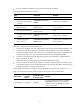
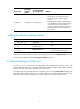
To forcibly bring up a fiber port:
Step Command Remarks
1. Enter system view.
system-view N/A
2. Enter Ethernet interface
view.
interface interface-type
interface-number
N/A
Correct fiber
connection
When Ethernet
interfaces cannot
be or are not
forcibly brought up
When Ethernet interfaces
are forcibly brought up
The fiber is
disconnected.
Fiber link
XGE1/0/1
XGE1/0/1
Device A
Device B
XGE1/0/1
XGE1/0/1
Device A
Device B
XGE1/0/1
XGE1/0/1
Device A
Device B
The interface is
down.
Packets
Fiber port Tx end Rx end