
R211x-HP Flexfabric 11900 Layer 2 - LAN Switching Configuration Guide

11
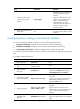
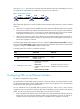
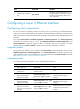
Step Command Remarks
3. Forcibly bring up the fiber
port.
port up-mode
By default, a fiber Ethernet port is not
forcibly brought up, and the physical state
of a fiber port depends on the physical
state of the fibers.
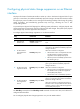
Configuring a Layer 2 Ethernet interface
Configuring storm suppression
You can use the storm suppression function to limit the size of a particular type of traffic (broadcast,
multicast, or unknown unicast traffic) on an interface. When the broadcast, multicast, or unknown unicast
traffic on the interface exceeds this threshold, the system discards packets until the traffic drops below this
threshold.
Any of the storm-constrain, broadcast-suppression, multicast-suppression, and unicast-suppression
commands can suppress storm on a port. The broadcast-suppression, multicast-suppression, and
unicast-suppression commands suppress traffic in hardware, and have less impact on device
performance than the storm-constrain command, which performs suppression in software.
Configuration guidelines
For the same type of traffic, do not configure the storm constrain command together with any of the
broadcast-suppression, multicast-suppression, and unicast-suppression commands. Otherwise, the
traffic suppression result is not determined. For more information about the storm-constrain command,
see "Configuring storm control on an Ethernet interface."
Configuration procedure
To set storm suppression thresholds on one or multiple Ethernet interfaces:
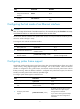
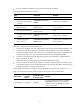
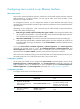
Step Command Remarks
1. Enter system view.
system-view N/A
2. Enter Layer 2 Ethernet
interface view.
interface interface-type
interface-number
N/A
3. Enable broadcast suppression
and set the broadcast
suppression threshold.
broadcast-suppression { ratio |
pps max-pps | kbps max-kbps }
By default, broadcast traffic is
allowed to pass through an
interface.
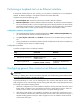
4. Enable multicast suppression
and set the multicast
suppression threshold.
multicast-suppression { ratio | pps
max-pps | kbps max-kbps }
By default, multicast traffic is
allowed to pass through an
interface.
5. Enable unknown unicast
suppression and set the
unknown unicast suppression
threshold.
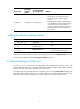
unicast-suppression { ratio | pps
max-pps | kbps max-kbps }
By default, unknown unicast traffic
is allowed to pass through an
interface.