
R211x-HP Flexfabric 11900 Layer 2 - LAN Switching Configuration Guide


14
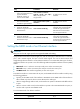
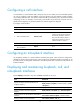
Ste
p
Command
Remarks
2. Enter Layer 2
Ethernet interface
view.
interface interface-type interface-number N/A
3. Set the MDIX
mode of the
Ethernet interface.
mdix-mode { automdix | mdi | mdix }
By default, an Ethernet interface
operates in auto mode to negotiate
pin roles with its peer.
Testing the cable connection of an Ethernet interface
IMPORTANT:
Fiber ports do not support this feature.
This feature tests the cable connection of an Ethernet interface and displays cable test results within 5
seconds. The test results include the cable's status and some physical parameters. If any fault is detected,
the test results include the length of the faulty cable segment.
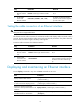
To test the cable connection of an Ethernet interface:
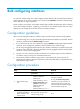
Step Command Remarks
1. Enter system view.
system-view N/A
2. Enter Layer 2
Ethernet interface
view.
interface interface-type interface-number N/A
3. Test the cable
connected to the
Ethernet interface.
virtual-cable-test
If the link of an Ethernet port is up,
testing its cable connection will cause
the link to come down and then go
up.
Displaying and maintaining an Ethernet interface
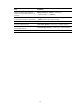
Execute display commands in any view and reset commands in user view.
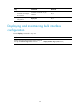
Task Command
Display interface traffic statistics.
display counters { inbound | outbound } interface [ interface-type
[ interface-number ] ]
Display traffic rate statistics of interfaces in
up state over the last sampling interval.
display counters rate { inbound | outbound } interface
[ interface-type [ interface-number ] ]
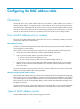
Display the operational and status
information of the specified interface or all
interfaces.
display interface [ interface-type [ interface-number ] ]
Display summary information about the
specified interface or all interfaces.
display interface [ interface-type [ interface-number ] ] brief
[ description ]