
R211x-HP Flexfabric 11900 Layer 2 - LAN Switching Configuration Guide

23
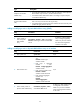
Type Description
Multiport unicast MAC
address entry
• Learns the MAC address (for example, MAC A) of the frame, adds a dynamic
MAC address entry for MAC A, and forwards the frame.
• Forwards the frames destined for MAC A according to only the multiport
unicast MAC address entry.
Dynamic MAC address
entry
• Learns the MAC address of the frame entered on a different interface from
that in the entry and overwrites the original entry.
• Forwards the frame entered on the same interface with that in the entry and
updates the aging timer for the entry.
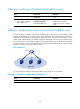
Adding or modifying a static or dynamic MAC address entry globally
Step Command Remarks
1. Enter system view.
system-view N/A
2. Add or modify a
static or dynamic
MAC address
entry.
mac-address { dynamic | static } mac-address
interface interface-type interface-number vlan
vlan-id
By default, no MAC address
entry is configured globally.
Make sure you have created
the VLAN and assigned the
interface to the VLAN.
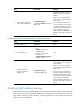
Adding or modifying a static or dynamic MAC address entry on an interface
Step Command Remarks
1. Enter system view.
system-view N/A
2. Enter interface view.
• Enter Layer 2 Ethernet interface
view:
interface interface-type
interface-number
• Enter Layer 2 aggregate
interface view:
interface bridge-aggregation
interface-number
• Enter S-channel interface view:
interface s-channel
interface-number.channel-id
• Enter S-channel aggregate
interface view:
interface
schannel-aggregation
interface-number:channel-id
N/A
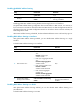
3. Add or modify a static or
dynamic MAC address entry.
mac-address { dynamic | static }
mac-address vlan vlan-id
By default, no MAC address entry
is configured on an interface.
Make sure you have created the
VLAN and assigned the interface
to the VLAN.