
R211x-HP Flexfabric 11900 Layer 2 - LAN Switching Configuration Guide

25
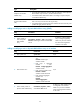
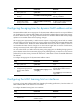
Step Command Remarks
2. Add or modify a multiport
unicast MAC address entry.
mac-address multiport
mac-address interface interface-list
vlan vlan-id
By default, no multiport unicast
MAC address entry is configured
globally.
Make sure you have created the
VLAN and assigned the interface
to the VLAN.
Do not configure an interface as
the output interface of a multiport
unicast MAC address entry if the
interface receives frames destined
for the multiport unicast MAC
address. Otherwise, the frames are
flooded in the VLAN to which they
belong.
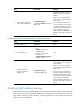
Configuring a multiport unicast MAC address entry on an interface
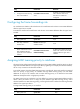
Step Command Remarks
1. Enter system view.
system-view N/A
2. Enter interface view.
• Enter Layer 2 Ethernet interface
view:
interface interface-type
interface-number
• Enter Layer 2 aggregate
interface view:
interface bridge-aggregation
interface-number
N/A
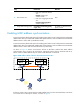
3. Add the interface to a
multiport unicast MAC
address entry.
mac-address multiport
mac-address vlan vlan-id
By default, no multiport unicast
MAC address entry is configured
on an interface.
Make sure you have created the
VLAN and assigned the interface
to the VLAN.
Do not configure an interface as
the output interface of a multiport
unicast MAC address entry if the
interface receives frames destined
for the multiport unicast MAC
address. Otherwise, the frames are
flooded in the VLAN to which they
belong.
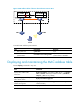
Disabling MAC address learning
MAC address learning is enabled by default. To prevent the MAC address table from being saturated
when the device is experiencing attacks, disable MAC address learning. For example, you can disable
MAC address learning to prevent the device from being attacked by a large amount of frames with
different source MAC addresses.