
R211x-HP Flexfabric 11900 Layer 2 - LAN Switching Configuration Guide

28
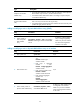
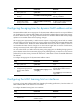
Step Command Remarks
3. Configure the MAC learning
limit on the interface.
mac-address max-mac-count
count
By default, no maximum number of
MAC addresses that can be
learned on an interface is
configured.
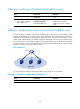
Configuring the frame forwarding rule
You can determine whether to allow the device to forward frames with unknown source MAC addresses
after the upper limit is reached.
To enable the interface to forward frames with unknown source MAC addresses after the upper limit is
reached:
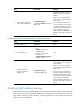
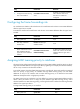
Step Command Remarks
1. Enter system view.
system-view N/A
2. Enter Layer 2 Ethernet
interface view..
interface interface-type
interface-number
N/A
3. Enable the device to forward
frames with unknown source
MAC addresses after the
upper limit on the interface is
reached.
mac-address max-mac-count
enable-forwarding
By default, the interface forwards
frames with unknown source MAC
addresses after the upper limit is
reached.
Assigning MAC learning priority to interfaces
All networks that perform MAC-based forwarding are facing MAC address spoofing attacks. A device
might learn the MAC address of an upper layer device (a gateway, for example) to a downlink interface,
due to a loop or attack to the downlink interface.
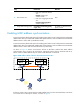
To avoid the situation, the idea of MAC learning priority is introduced, where each interface is assigned
either low priority or high priority. An interface with high MAC learning priority can learn MAC
addresses as usual, but an interface with low MAC learning priority is not allowed to learn MAC
addresses already learned on a high-priority interface.
The MAC learning priority mechanism can help defend your network against MAC address spoofing
attacks. What you need to do is to assign an uplink interface high MAC learning priority, and a
downlink interface low MAC learning priority, preventing the downlink interface from learning the MAC
address of an upper layer device.
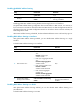
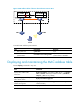
To assign MAC learning priority to an interface:
Step Command Remarks
1. Enter system view.
system-view N/A