
R211x-HP Flexfabric 11900 Layer 2 - LAN Switching Configuration Guide
31
MAC address table configuration example
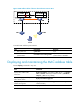
Network requirements
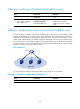
Host A at MAC address 000f-e235-dc71 is connected to interface Ten-GigabitEthernet 1/0/1 of Device
and belongs to VLAN 1.
Host B at MAC address 000f-e235-abcd, which once behaved suspiciously on the network, also belongs
to VLAN 1.
Configure the MAC address as follows:
• To prevent MAC address spoofing, add a static entry for Host A in the MAC address table of
Device.
• Add a blackhole MAC address entry for Host B, so that all frames destined for the host will be
dropped.
• Set the aging timer for dynamic MAC address entries to 500 seconds.
Configuration procedure
# Add a static MAC address entry for MAC address 000f-e235-dc71 on Ten-GigabitEthernet 1/0/1 that
belongs to VLAN 1.
<Device> system-view
[Device] mac-address static 000f-e235-dc71 interface ten-gigabitethernet 1/0/1 vlan 1
# Add a blackhole MAC address entry for MAC address 000f-e235-abcd that belongs to VLAN 1.
[Device] mac-address blackhole 000f-e235-abcd vlan 1
# Set the aging timer for dynamic MAC address entries to 500 seconds.
[Device] mac-address timer aging 500
Verifying the configuration
# Display the static MAC address entry for interface Ten-GigabitEthernet 1/0/1.
[Device] display mac-address static interface ten-gigabitethernet 1/0/1
MAC Address VLAN ID State Port/NickName Aging
000f-e235-dc71 1 Static XGE1/0/1 N
# Display information about the blackhole MAC address entries.
[Device] display mac-address blackhole
MAC Address VLAN ID State Port/NickName Aging
000f-e235-abcd 1 Blackhole N/A N
# View the aging time of dynamic MAC address entries.
[Device] display mac-address aging-time
MAC address aging time: 500s.