
R211x-HP Flexfabric 11900 Layer 2 - LAN Switching Configuration Guide

34
MAC Information configuration example
Network requirements
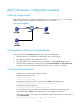
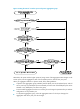
Enable MAC Information on interface Ten-GigabitEthernet 1/0/1 on Device in Figure 6 to send MAC
address changes in syslog messages to the log host, Host B, of the interface.
Figure 6 Network diagram
Configuration restrictions and guidelines
When you edit the file /etc/syslog.conf, follow these restrictions and guidelines:
• Comments must be on a separate line and must begin with a pound sign (#).
• No redundant spaces are allowed after the file name.
• The logging facility name and the severity level specified in the /etc/syslog.conf file must be
identical to those configured on the device by using the info-center loghost and info-center source
commands. Otherwise, the log information might not be output correctly to the log host.
Configuration procedure
1. Configure Device to send syslog messages to Host B:
# Enable the information center.
<Device> system-view
[Device] info-center enable
# Specify the log host 192.168.1.2/24 and specify local4 as the logging facility.
[Device] info-center loghost 192.168.1.2 facility local4
# Disable log output to the log host.
[Device] info-center source default loghost deny
To avoid output of unnecessary information, disable all modules from outputting logs to the
specified destination (loghost, in this example) before you configure an output rule.
# Configure an output rule to output to the log host MAC address logs that have a severity level of
at least informational.
[Device] info-center source mac loghost level informational