
R211x-HP Flexfabric 11900 Layer 2 - LAN Switching Configuration Guide

48
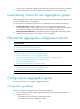
Shutting down or bringing up an aggregate interface affects the aggregation state and link state of ports
in the corresponding aggregation group in the following ways:
• When an aggregate interface is shut down, all Selected ports in the corresponding aggregation
group become unselected and their link state becomes down.
• When an aggregate interface is brought up, the aggregation state of ports in the corresponding
aggregation group is recalculated.
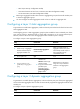
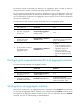
To shut down an aggregate interface:
Step Command Remarks
1. Enter system view.
system-view N/A
2. Enter Layer 2 aggregate
interface view.
interface bridge-aggregation
interface-number
N/A
3. Shut down the aggregate
interface.
shutdown
By default, aggregate interfaces
are up.
Restoring the default settings for an aggregate interface
You can return all configurations on an aggregate interface to default settings.
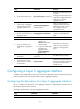
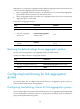
To restore the default settings for an aggregate interface:
Step Command
1. Enter system view.
system-view
2. Enter Layer 2 aggregate interface view.
interface bridge-aggregation interface-number
3. Restore the default settings for the aggregate
interface.
default
Configuring load sharing for link aggregation
groups
This section explains how to configure load sharing criteria for link aggregation groups and how to
enable local-first load sharing for link aggregation.
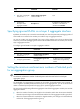
Configuring load sharing criteria for link aggregation groups
You can configure global or group-specific load sharing criteria. A link aggregation group preferentially
uses the group-specific load sharing criteria. If no group-specific load sharing criteria is available, the
group uses the global load sharing criteria.