
R211x-HP Flexfabric 11900 Layer 2 - LAN Switching Configuration Guide

91
Ste
p
Command
Remarks
3. Enable Digest Snooping on
the interface.
stp config-digest-snooping
By default, Digest Snooping is
disabled on ports.
4. Return to system view.
quit N/A
5. Enable Digest Snooping
globally.
stp global config-digest-snooping
By default, Digest Snooping is
disabled globally.
Digest Snooping configuration example
Network requirements
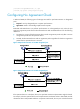
As shown in Figure 21, Device A and Device B connect to Device C, which is a third-party device. All
these devices are in the same region.
Enable Digest Snooping on the ports of Device A and Device B that connect to Device C, so that the three
devices can communicate with one another.
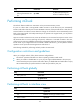
Figure 21 Network diagram
Configuration procedure
# Enable Digest Snooping on Ten-GigabitEthernet 1/0/1 of Device A and enable global Digest
Snooping on Device A.
<DeviceA> system-view
[DeviceA] interface ten-gigabitethernet 1/0/1
[DeviceA-Ten-GigabitEthernet1/0/1] stp config-digest-snooping
[DeviceA-Ten-GigabitEthernet1/0/1] quit
[DeviceA] stp global config-digest-snooping
# Enable Digest Snooping on Ten-GigabitEthernet 1/0/1 of Device B and enable global Digest
Snooping on Device B.
<DeviceB> system-view
[DeviceB] interface ten-gigabitethernet 1/0/1
[DeviceB-Ten-GigabitEthernet1/0/1] stp config-digest-snooping